---
title: How do I install the Educatly Ambassador Chat plugin?
description: How to install the Educatly Ambassador plugin on your website, including the chat widget
---
[Back to home](https://docs.educatly.com/knowledge)
- [ I am a University
](https://docs.educatly.com/knowledge/i-am-a-university)
# How do I install the Educatly Ambassador Chat plugin?
## How to install the Educatly Ambassador plugin on your website, including the chat widget
Educatly Ambassadors offers you a plugin that you can embed on the website. This includes:
- A plugin on a specific page on your university website that allows visitors to chat with your ambassadors.
- A widget on all pages or on the desired pages on your university website that leads visitors to the Educatly Ambassador plugin.
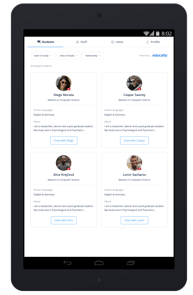
*Left: The Educatly Ambassador Plugin. Right: The widget.*
### Educatly Ambassador Plugin
Once you [signed up with us](https://www.educatly.com/for-universities), we will provide you with a code-snippet that needs to be embedded in your website.
The code will look like this:
```
```
Where $ei_id should be replaced with the ei_id that is provided to your institution by us.
Make sure this is placed in your website where it has sufficient space to be visible. The width and height provided are default, which can be changed based on your requirements. Although we recommend a height of at least 100vh for best user experience.
The best experience is achieved if you can embed the plugin on a dedicated page that is empty despite for a header and a footer.
Before installing the plugin, you will be able to get a preview under the following URL: https://www.educatly.com/ambassadors/$ei_id where $ei_id should be replaced with the ei_id that is provided to you institution by us.
You can see an example of the plugin in action [here](https://www.educatly.com/ambassadors/44480)
### Widget
Once you [signed up with us](https://ambassador.educatly.com/knowledge/how-do-i-join-educatly-ambassadors), we will provide you with a code-snippet that needs to be embedded in your website.
Below is the code for the widget. Copy and paste this code as the first item into the of every webpage where you want the widget to be shown.
```
```
Where YOUR_PATH is the page on your website where you previously installed the plugin. For example if you installed the plugin on [https://educatly.com/for-students](https://educatly.com/for-students), you would put that instead of YOUR_PATH.
Your Ambassador plugin might not be placed at the top of your university page but below the fold. In that case it is advised to provide an anchor at the end. The plugin already comes with the anchor edu-ambassador-iframe, so if you installed the plugin on https:/// **YOUR_PATH** would be https:///**YOUR_PATH**#edu-ambassador-iframe
#### Support
If you have any trouble installing the widget, please do not hesitate to reach out to us via universities@educatly.com. We will make sure to get the plugin and/or widget installed for you in no time!